 Huge Update, Version 2.1.0

The latest IgorBox release lands today, and it's a big one. We've spent the last few cycles focused on two things our community has been asking for: making the timeline editor feel even better to work in, and turning Logic Rules into a real visual programming surface for the kinds of effects you've been dreaming up.
Grab a coffee. There's a lot here.
Timeline Editor
Draw curves with Apple Pencil and Wacom
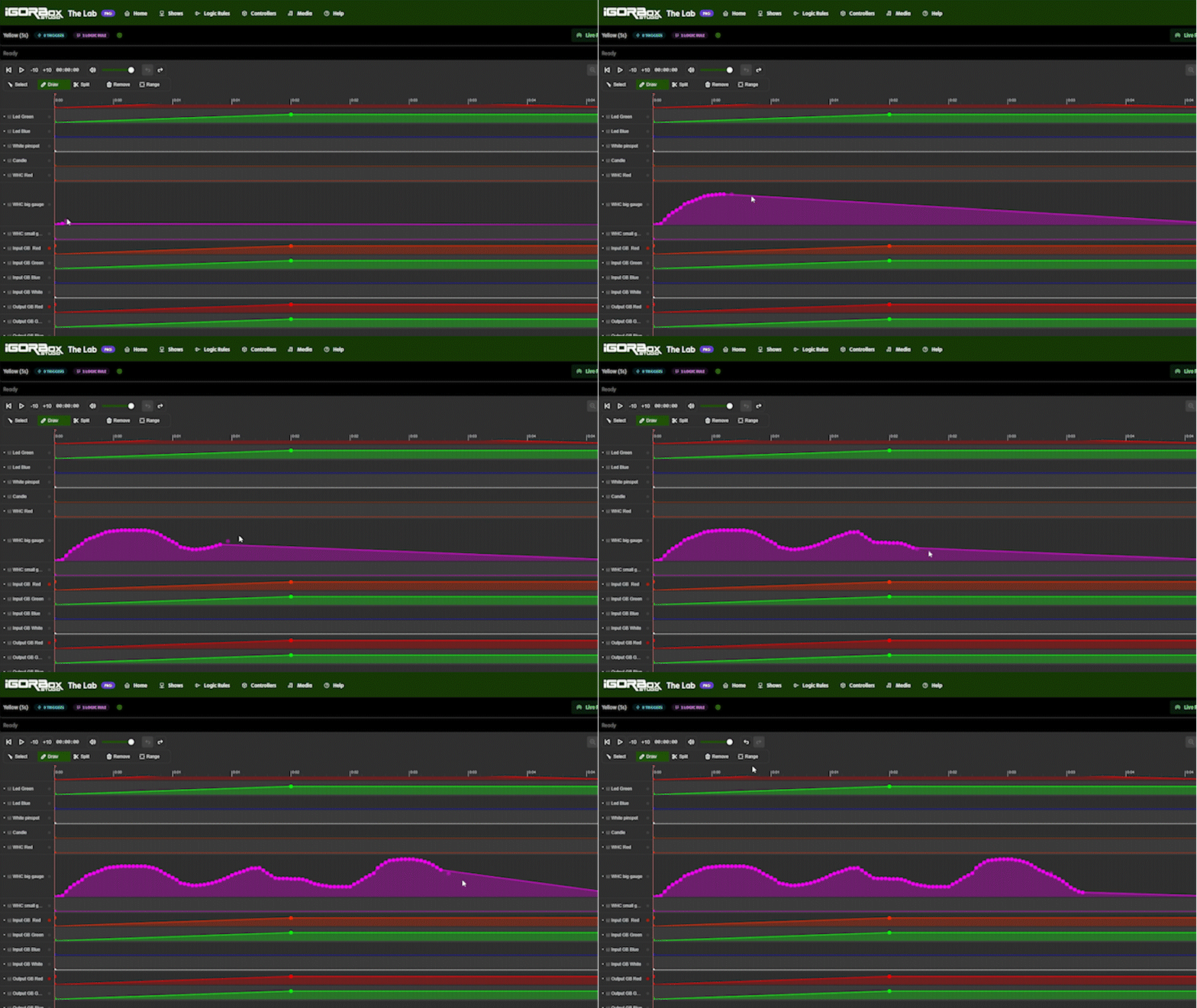
If you have an iPad, this one's for you. The Apple Pencil now draws continuous curves directly onto your LED Controller tracks. Just put the tip down and sweep. Each grid cell you cross drops a smooth control point, and the curve follows your hand exactly the way you'd expect.
Wacom pens get the same treatment on desktop. Once your pen touches the tablet, the timeline knows you're drawing and behaves accordingly.
For everyone else, the click‑and‑drag and tap‑to‑add flows you already know are unchanged. But you can also draw a curve by clicking and holding with the right mouse button instead of the left.
Loop Playback
There's a new loop button in the transport bar. Flip it on and playback wraps back to the start instead of stopping at the end. Perfect for tightening up a section while it's running in front of you.
Pair it with a range selection and the loop tightens up to just that range. The range tool now stays out of your way while looping is on, so you can keep switching between select, draw, and split without losing your loop. Your loop preference is remembered per show.
This only applies to editing playback and live preview. This does not cause a show to loop once deployed.
Copy a slice of your timeline
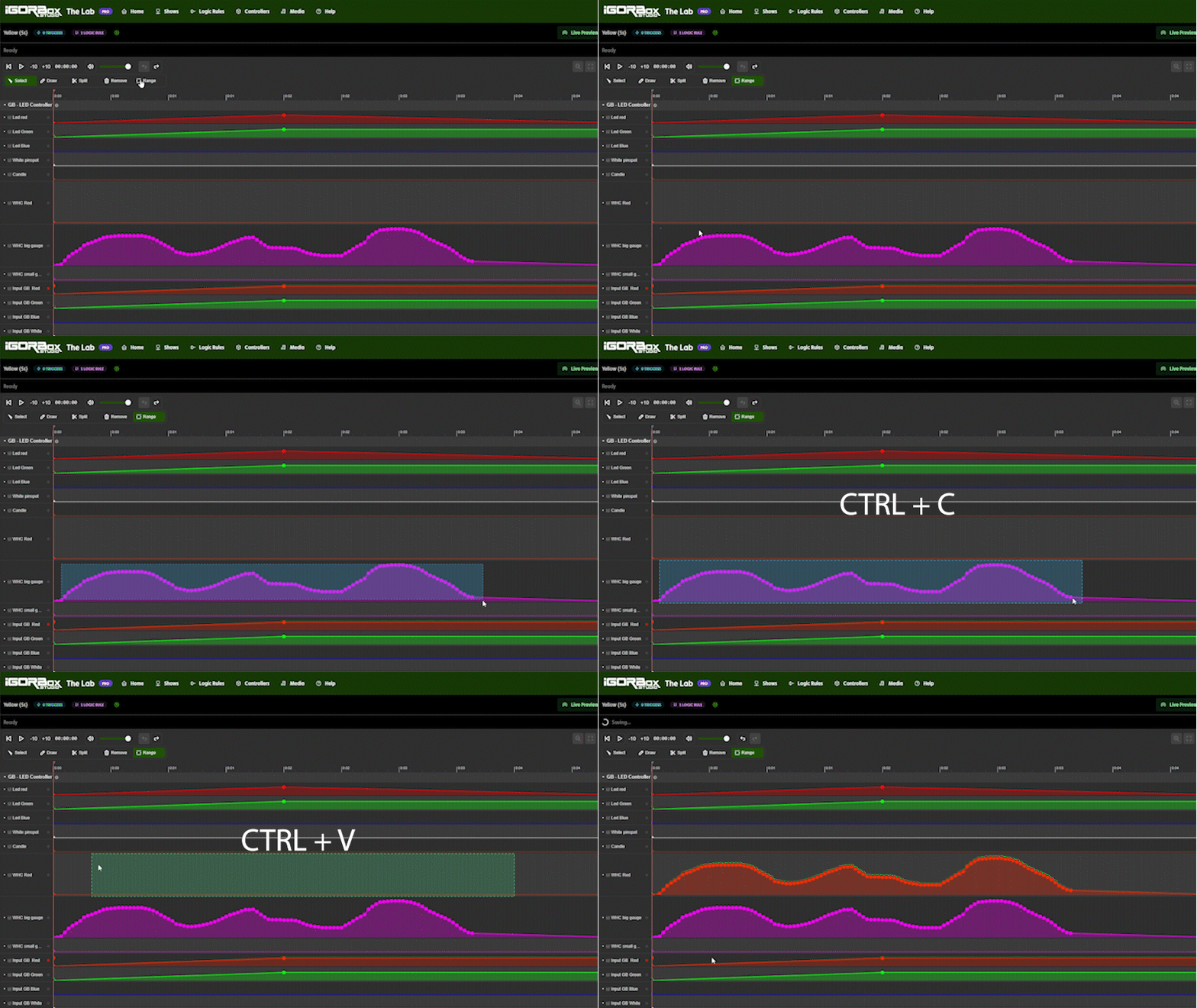
Make a range selection, hit Ctrl+C (Cmd+C on Mac), and everything inside that range is on your clipboard: clips, control points, audio, all of it. Audio clips clamped at the boundaries get their trim adjusted automatically so the copied chunk plays back the way you'd expect.
A timeline shortening fix you'll feel
If you trimmed a show's duration in Show Settings and you had an audio clip that was going to get clipped, the audio clip would just be removed. We have fixed this very annoying bug and now when you shorten your show, your audio clips shorten as well.
Audio compatibility warnings
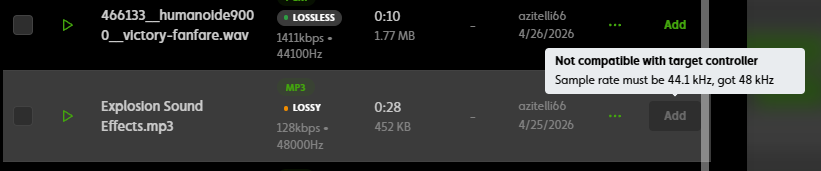
Although our controllers support multiple audio formats (like MP3, WAV, and FLAC), not all possible formats are supported. The studio now checks every audio file against the controllers it'll play on, and tells you about problems before you deploy:
- Files that won't play on a target are flagged in the media picker with a clear "why."
- Audio clips already in your timeline get a warning icon if a compatibility issue surfaces.
- The accepted formats for the controller are listed up front in the media picker so you know what to look for.
- Deploys are blocked when there's a real problem, with a per‑clip breakdown of what to fix.
No more surprises at showtime because a file silently wouldn't decode.
Logic Rules: A Lot
We've been steadily building out IgorBox's visual logic editor, and this release is the biggest leap yet. Four new node types, full revision history, and a much friendlier editing experience as we inch closer to getting the Logic Rules system out of "Beta".
You must upgrade your controller to firmware version 2.1.0+ to get these new features.
Revision History and Undo/Redo
Logic Rules now version the way Shows do.
- The editor autosaves your work as a draft.
- When you're ready, hit Deploy to snapshot the rule and push it to your controller.
- Don't like the new version? Restore the deployed version back to a draft, tweak, redeploy.
- Inside the editor, undo/redo gives you a 50‑step history with smart batching for drags, so a long edit session is fully reversible.
Builder tier users get one prior version of history; Pro and Enterprise get unlimited.
Sequence Node: pattern‑matching inputs
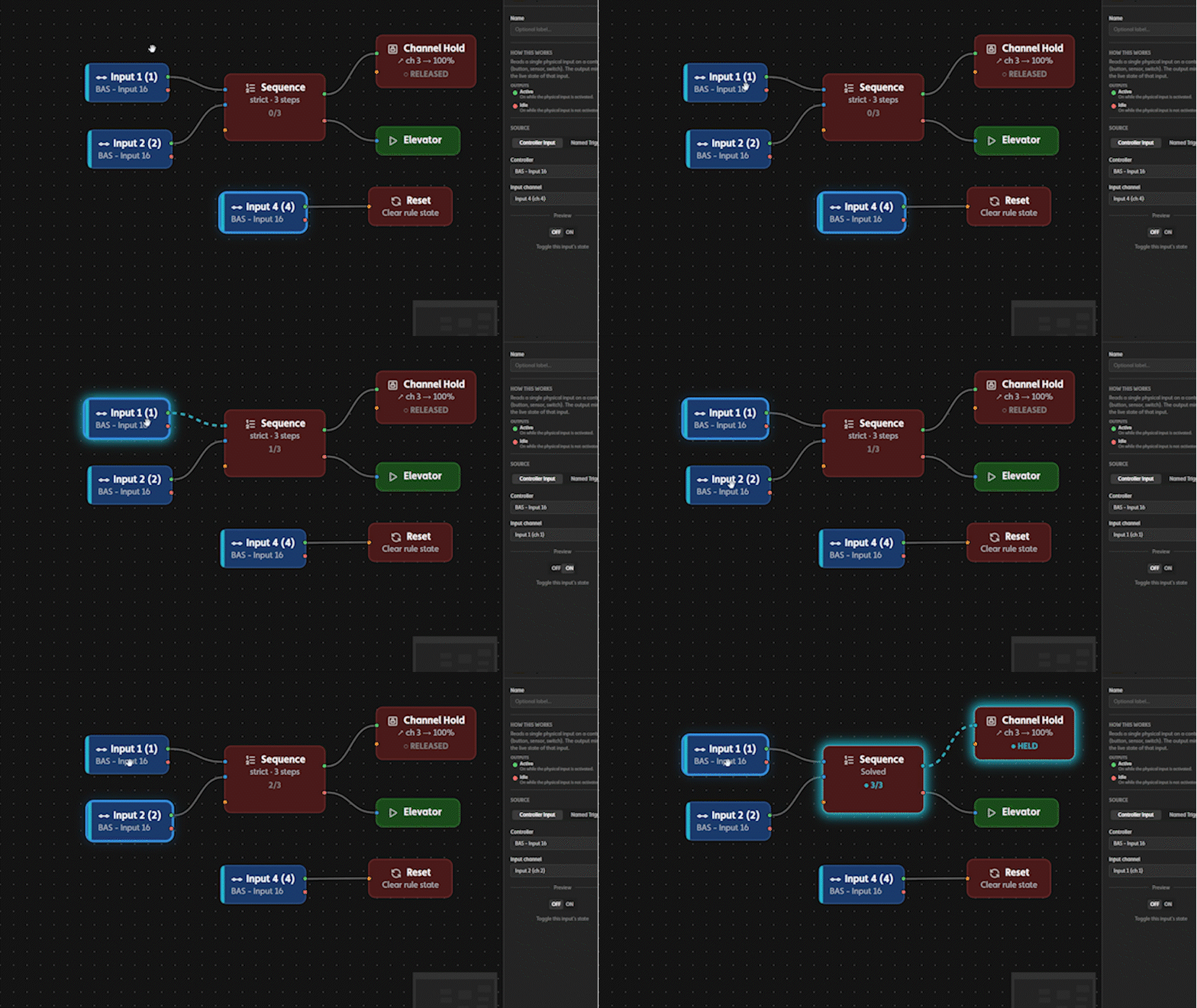
The new Sequence node fires when a series of inputs are activated in a specific order. Two modes:
- Lenient: wrong inputs are ignored. Walk the sequence at your own pace.
- Strict: a wrong input pulses a "failed" output and resets the progress. Great for guess‑the‑code puzzles.
Up to 7 step inputs per sequence, in any order you choose, with a reset port that snaps progress back to the beginning whenever you need it.
Morse Code Node: rhythmic input patterns
The Morse Code node listens to a single button or input and fires when the rhythm of presses matches a pattern. Tap‑to‑record lets you press the pattern yourself instead of typing dots and dashes, and there are presets for SOS and OK if you want a quick start.
This is the building block for escape rooms, themed installations, or anywhere "the right knock at the right door" is part of the magic.
Channel Hold Node: lock an output until you say so
Channel Hold takes ownership of an output and holds it at a specific value until the rule's Reset fires. While a channel is held, shows, ambient shows, and manual control are all locked out. Only the rule that grabbed it can release it.
You can hold local outputs on the controller running the rule, OR target an output on a different controller in your studio. That means one button on Controller A can latch an output on Controller B until a separate reset frees it. Perfect for cross‑prop puzzle dependencies.
The studio shows you exactly which channels are held and which rule is holding them, with tooltips explaining how to release them.
Reset and a Smarter Delay
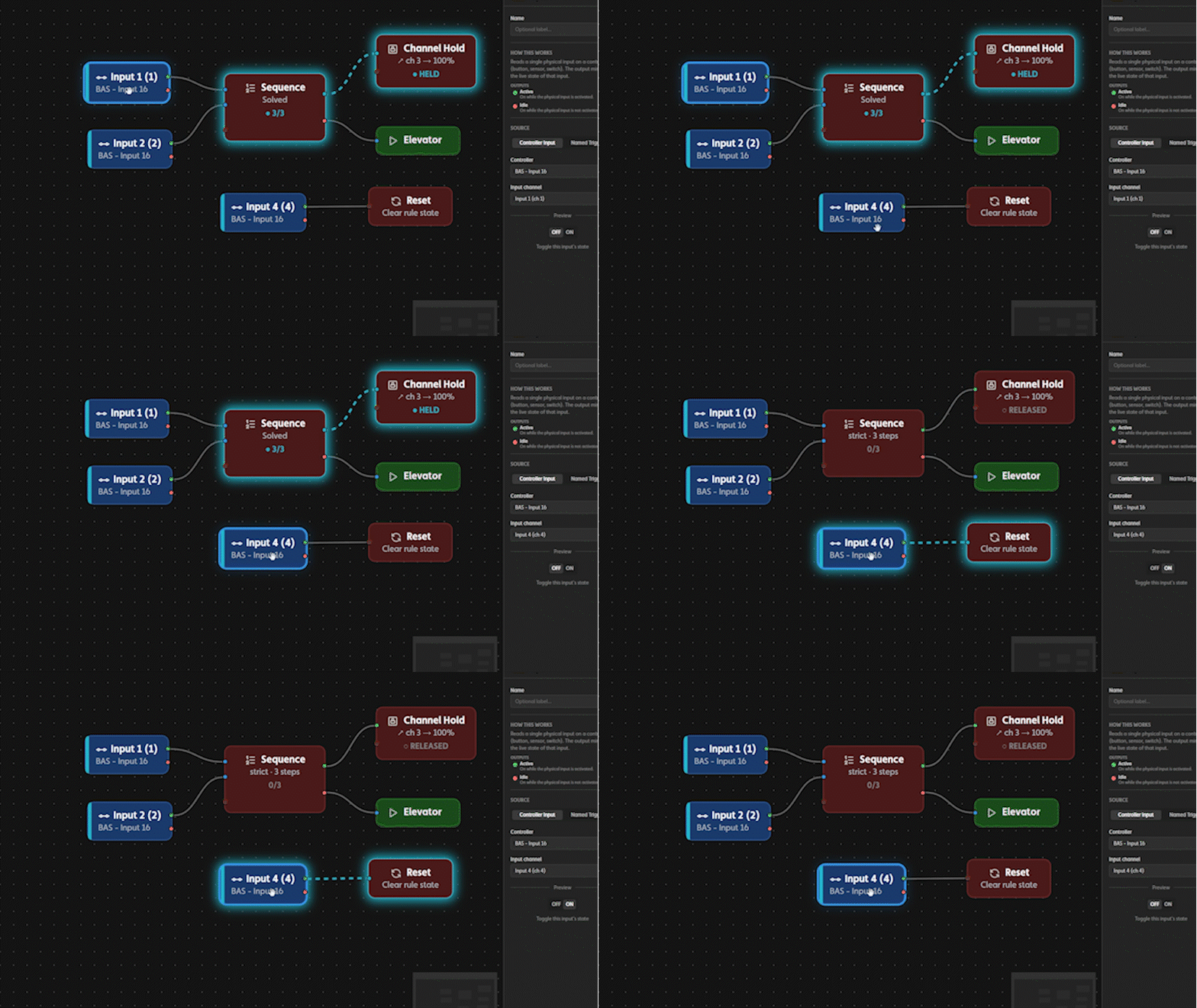
A new Reset node clears the state of every node in your logic tree on a single activation. Perfect for "reset puzzle" buttons. Each Reset node is scoped to the rule it lives in, so you can have multiple rules on a single controller and each rule can have its own "master reset" button.
The Delay node got a real state machine behind it with three modes that make sense:
- Restart: drops back to idle if the input falls before the timer completes.
- Latching: stays on after completion until you reset it.
- Accumulate: pulses bank into a running total. Output latches when the total clears the threshold.
Editor polish you'll feel immediately
- Every node has plain‑English help text describing what it does.
- Per‑port colored dots and functional names ("Trigger", "Reset") instead of generic numbers.
- Hover a port in the inspector and the matching port on the canvas highlights, and vice versa.
- The trigger and rule vocabularies match: "rising edge" is now "Activated," "falling edge" is "Deactivated."
- LED hold values use sliders with marks at 0/50/100%, the same feel as everywhere else in the studio.
Shows
Ambient Recovery: fade back into your ambient show
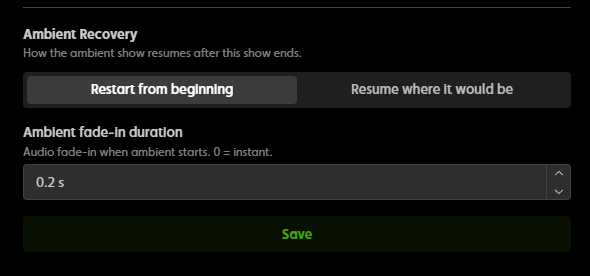
If your studio has an ambient show set, you can now configure each show to:
- Resume ambient automatically when the show finishes.
- Fade in the ambient audio over a duration you pick, instead of slamming back in.
You'll find it in Show Settings under "Ambient Recovery." Lovely for haunts, immersive installations, and any space where you need to ease back into an ambient show already in progress.
This setting is found on the show that has taken over. Each show that is played can handle the ambient recovery differently.
Trigger conflicts caught in the editor
If two shows try to use the same input on the same controller, that creates a strange situation because the controller can only play one show at a time. The show editor now detects this and disables conflicting trigger picks, surfacing the conflicting show inline so you know exactly what's in the way.
Controllers
Reboot your controllers from the web
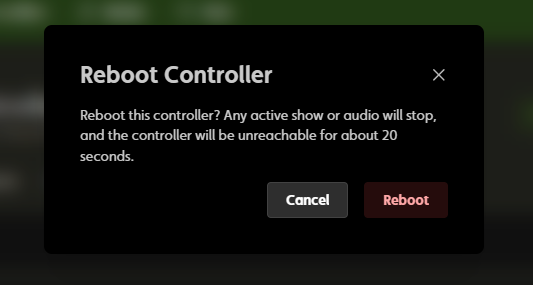
There's a new Reboot button on the Technical Details tab of every controller. One click, one confirmation, and your controller restarts cleanly. The button stays disabled if a controller's firmware is too old to support it, with a tooltip telling you so.
Smoother firmware updates
When a controller comes back online after a firmware update, the studio now picks it up instantly instead of waiting for the previous connection to time out. This also fixes a bug where a controller would have a green status LED but just shows "connecting" on the controller's overview page for about 60 seconds.
Firmware v2.1.0
This studio release ships hand‑in‑hand with a major firmware update for your controllers. When you accept the update prompt, here's what your hardware gets:
New on the controller side of Logic Rules
- Ordered‑input puzzle block: your controllers can now run the new Sequence puzzles locally, with all the timing and state tracking handled on the device.
- Morse Code puzzle block: match a single input against a pattern of timed presses, with separate outputs for success, failure, and timeout.
- Master reset block: clear the state of an in‑progress or completed puzzle and start fresh.
- Per‑node reset inputs: every stateful block (delays, latches, counters, sequences, Morse, channel holds) now has its own reset port so you can clear one piece of a rule without resetting the whole thing.
Audio and ambient
- Ambient resume. When a show or triggered sound finishes, the ambient show picks up where it would have been, not from the top.
- Smoother audio transitions. Ambient audio fades back in after a triggered sound or show ends, instead of cutting in cold.
- Faster first play. Fixed a bug that caused a noticeable lag the first time audio was triggered after boot. Sounds now fire immediately on the first hit.
Reliability
- Remote reboot support. The Reboot button in the studio's controller page is powered by a new handler in firmware. One click, one clean restart.
- Delay fix. Squashed a bug that caused delay blocks to reset at the wrong time in some rule configurations.
Get the update
The new studio release is live right now. Open up the studio and your new features are waiting. Note that many of them require firmware v2.1.0+.
Firmware v2.1.0 is also available and all your controllers should have an "upgrade firmware" prompt on their controller overview page. Just accept the prompt when it's convenient. Many of our new features (Channel Hold, Sequence, Master Reset, Ambient Recovery, Reboot) need v2.1.0 to work, and the studio will tell you when a controller is still on an older version and a feature isn't available.
As always, thanks for building wild things with IgorBox.