Firmware 2.2.1: Shows That Play to the End

Two days after 2.2.0, we have a small follow-up. Firmware v2.2.1 adds one feature, and it came straight from a customer: some shows need to play all the way through, no matter what fires while they're running.
The problem
Until now, whether a running show got cut off was up to the trigger that fired next. Set a trigger to Take Over or Restart and it would stop whatever was playing. Press a Toggle button again and the show would end. That's usually what you want. But some scenes can't be cut short: a safety briefing, a timed reveal, or a sequence that has to park its props safely before anything else happens. If a guest keeps walking through the sensor beam, the show shouldn't stop or start over.
Make a show play to the end
Open the show in the timeline editor, click the gear icon for Show Settings, and open the new Advanced section. Turn on Prevent triggers from interrupting this show, click Save, then deploy the show.
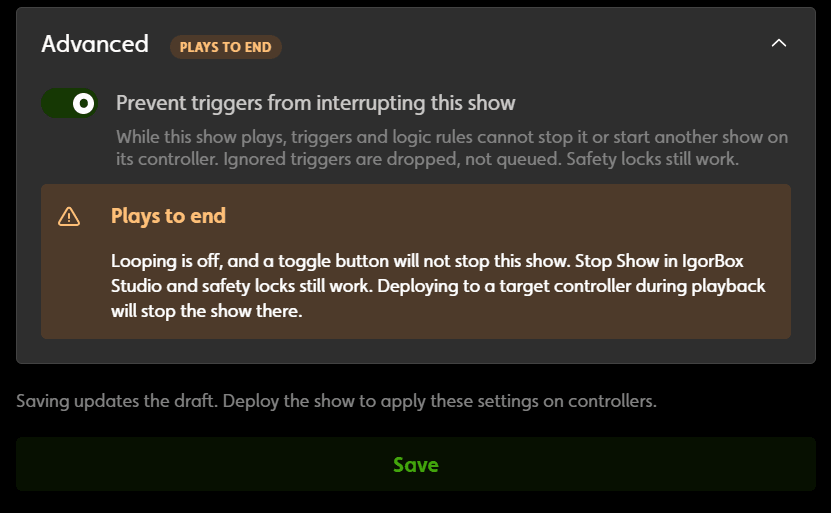
Once that show starts, its controller ignores triggers and Logic Rules that would stop it or start something else, until the show finishes. Triggers that arrive in the meantime are dropped. Studio marks the show with an orange Plays to end label everywhere it appears, including in the trigger and rule editors, so nobody wonders why a button isn't doing anything.
A few things worth knowing:
- Your emergency stop still works. Soft Lock and Hard Lock triggers, the front button in Stop or Safety Lock mode, and Stop Show in IgorBox Studio all still stop the show.
- Deploying stops it too. Deploying any show to that controller stops whatever it's playing, so save your deploys for when it's idle.
- It isn't for every show. A show can loop or play to the end, but not both, and ambient shows can't use it. Every trigger aimed at that controller is ignored for the whole length of the show, so keep these shows short.
The full list of what a protected show ignores, and what can still stop it, is on the new help page: Protecting a Show from Interruption.
Get the update
Firmware v2.2.1 is rolling out now, and your controllers will show an "upgrade firmware" prompt on their overview page. The new setting needs v2.2.1 on every controller the show plays on, and Studio won't let you turn it on until they're all updated. Nothing else changes in this release, so if you don't need the setting, update whenever it's convenient.
Thanks again for telling us what you need. Keep the requests coming!