Protecting a Show from Interruption
Some shows have to play all the way through: a safety briefing, a timed reveal, a scene where props must reach a safe position before anything else happens. The Prevent triggers from interrupting this show setting makes sure of that. Once a protected show starts, no trigger or Logic Rule can stop it or replace it with another show until it finishes.
Normally, what happens when a trigger fires during a show is decided by the incoming trigger's Retrigger setting (Take Over, Restart, Skip if Playing, or Toggle; see Triggers). This setting lets the playing show decide instead: while it runs, it wins.
The setting works on the controller, so every controller the show targets needs firmware 2.2.1 or newer. IgorBox Studio won't let you turn it on until all of the show's targets are updated.
Turning it on
- Go to Shows and open the show in the timeline editor.
- Click the gear icon (Show Settings) in the toolbar.
- Open the Advanced section.
- Turn on Prevent triggers from interrupting this show.
- Click Save.
- Click Deploy in the timeline editor.
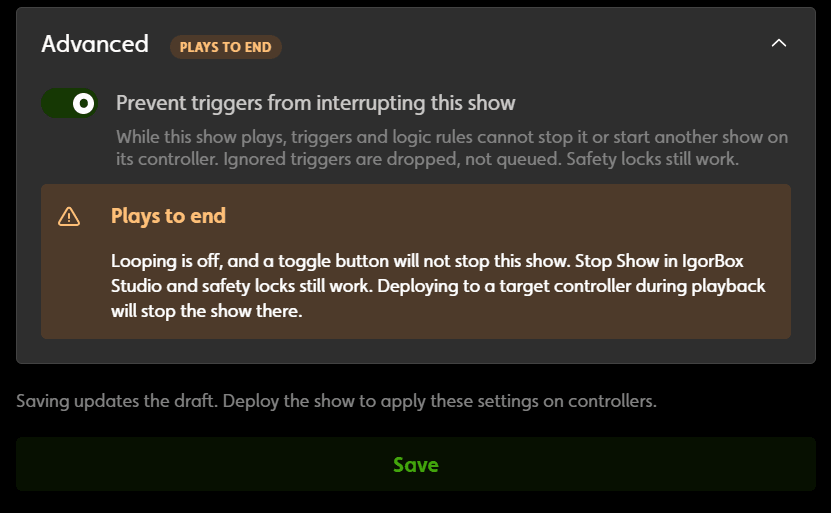
The setting is off by default. Once it's on, an orange Plays to end label appears in Show Settings (hover over it for a reminder of what can still stop the show). The same label shows up everywhere the show appears, so you can't miss it:
- on the show's card in the Shows list
- above the timeline (click it to jump straight to Show Settings)
- in the show's Triggers editor
- in the trigger action picker, wherever a trigger plays this show
- on a Logic Rule node that plays this show, and in that node's settings
Save only updates your draft. Your controllers keep playing the version they already have, with or without protection, until you deploy the show again. The same goes for turning protection off. Deploy while the controller is idle: deploying to a controller stops whatever it's playing, protected or not (see below).
When the switch is unavailable
- The show is an ambient routine. An ambient routine has to give way when a trigger fires, so it can't be protected. Studio greys out the switch and explains why.
- A target controller is on older firmware. Studio greys out the switch and tells you how many of the show's controllers are below 2.2.1. Update their firmware and the switch becomes available.
- The show loops. A show can loop or be protected, not both. Turning protection on turns Loop this show off, and turning looping on turns protection off. (A looping show never finishes, so protecting it would lock out triggers forever.)
If a show already has protection on, you can always turn it off, even when one of the conditions above applies.
What a protected show ignores
While a protected show is playing on a controller, that controller ignores anything that would normally interrupt it:
- A trigger that would start a different show, whatever its Retrigger setting (Take Over, Restart, or Toggle). Skip if Playing already did nothing while a show played, and still doesn't.
- A trigger whose action is Stop.
- A Toggle trigger pressed a second time to stop the show. A "press again to stop" button does nothing until the show ends. This is intentional.
- An input on a different controller that's wired to start or stop a show on this one.
- A Logic Rule that plays a show or fires a trigger, including rules started by an inbound webhook.
- The front button when it's set to Trigger mode.
A trigger that arrives during a protected show is dropped. Nothing plays afterward to "catch up". If you want the scene to happen, the guest, sensor, or operator has to fire it again once the protected show ends.
Protection works per controller. If one trigger plays shows on several controllers, the controllers that aren't running a protected show still respond normally. Only the controller playing the protected show ignores it.
What still works normally
- When the protected show ends, a show it's chained to starts as usual.
- If nothing is chained, the controller returns to its ambient routine as usual.
- A trigger can always start a show over an ambient routine. Ambient routines are never protected.
What can still stop a protected show
Protection only blocks triggers and Logic Rules. All of the following still stop a protected show right away:
Things you do on purpose
- Clicking Stop Show, or playing another show, from IgorBox Studio.
- Starting Manual Control. Live Preview uses Manual Control, so previewing any show on that controller stops the protected show too.
- Pressing the front button when it's set to Stop mode.
- Pressing the front button when it's set to Safety Lock mode.
Emergency stops
- A trigger whose action is Soft Lock or Hard Lock. Lock actions always work, protected show or not. This is the one kind of trigger that does stop a protected show, so a wired emergency stop is never blocked.
Maintenance that briefly pauses the controller
- Deploying any show to that controller, even a completely different show. The controller pauses playback while it saves the new show, which stops whatever is playing.
- Clear Cache or Format/Repair Storage on the controller's page (see Storage), or sending a crash report from Studio.
- A firmware update.
- The controller's first connection to IgorBox Studio after it powers on. It checks that its shows are up to date, which stops a protected show that a trigger started in the few seconds before that connection. Reconnecting after a network drop doesn't do this.
Restarts
- Rebooting the controller from Studio, a factory reset, or a loss of power.
Things that change the show without stopping it
- A Logic Rule that holds an output, for example keeping a maglock released after a puzzle is solved. The show keeps running, but it can't drive that output while the rule holds it.
- A Logic Rule that plays a sound. The sound takes over the controller's speaker; the show's lights and other outputs carry on.
Tips
- Don't deploy during a performance. Deploying any show to a controller stops a protected show on it (item 6 above). Save deploys for when the controller is idle.
- Keep protected shows short. Every trigger and rule aimed at that controller is ignored for the whole length of the show. A long protected show means a long stretch where nothing on that controller responds.
- Your emergency stop still works. Protection never weakens a Soft Lock or Hard Lock trigger, or the front button in Safety Lock or Stop mode. Wire your E-stop the same way you always would.
How to tell a trigger was ignored
Studio doesn't currently show a message when a protected show ignores a trigger. If a scene didn't fire when you expected, check whether the controller was playing a show marked Plays to end at the time. If it was, the trigger was dropped as described above.