 Firmware 2.2.3 and New Tools for Your Scenes

Hi friends.
Halloween is behind us, which means a lot of you are tearing down, catching up on sleep, or already sketching next year's rooms when you should be resting. I see you.
While you were running your shows, we were paying very close attention to what worked and what got in your way. Firmware 2.2.3 and the latest IgorBox Studio updates are what came out of that. Some of it is brand new, and some of it is us fixing things that were bugging you (and us). I'm going to start with the fun stuff.
Keeping the air on and sparks flowing
Here is a problem that sounds small until it happens in your room. You stop a scare, and the air supply for the whole scene shuts off with it. Or the heater on your spark machine goes cold between groups because nothing was telling it to stay on.
Preparation is our answer to that. You give the equipment its own named control in Studio, something your team will recognize like Spark Machine Heater, pick the outputs and the levels, and from then on it's just Turn on and Release on the controller's Overview tab. Shows can start and stop all night and it stays exactly where you put it. It also allows anyone with Studio access to see if preparations on a controller have been done for the night.
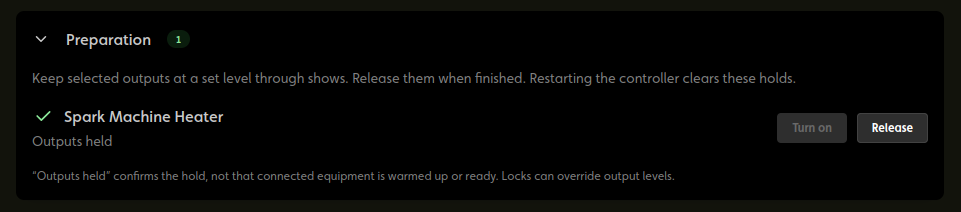
You can also put it on a Trigger Board, so whoever opens the room can switch it on from their phone.
The green check means the controller is holding the output. It doesn't know if your compressor is up to pressure or your heater is warm yet. You still have to look at the gauge to be sure. But the green checks mean everything has been set for another killer show.
A couple of small things I like: you can set up a control while the controller is offline and it applies when the controller reconnects, and saving a control never switches anything on by itself.
Puzzles got a lot more fun
This is the part I am most excited about, and it came straight from you. People kept asking us some version of the same question: "Can I let the players know they got the first part right?"
Now you can. The Sequence block has an output for every step, and you can put a time limit on the whole attempt. Plus we made it easier to understand and change your sequences directly in the logic block with drag and drop handles.
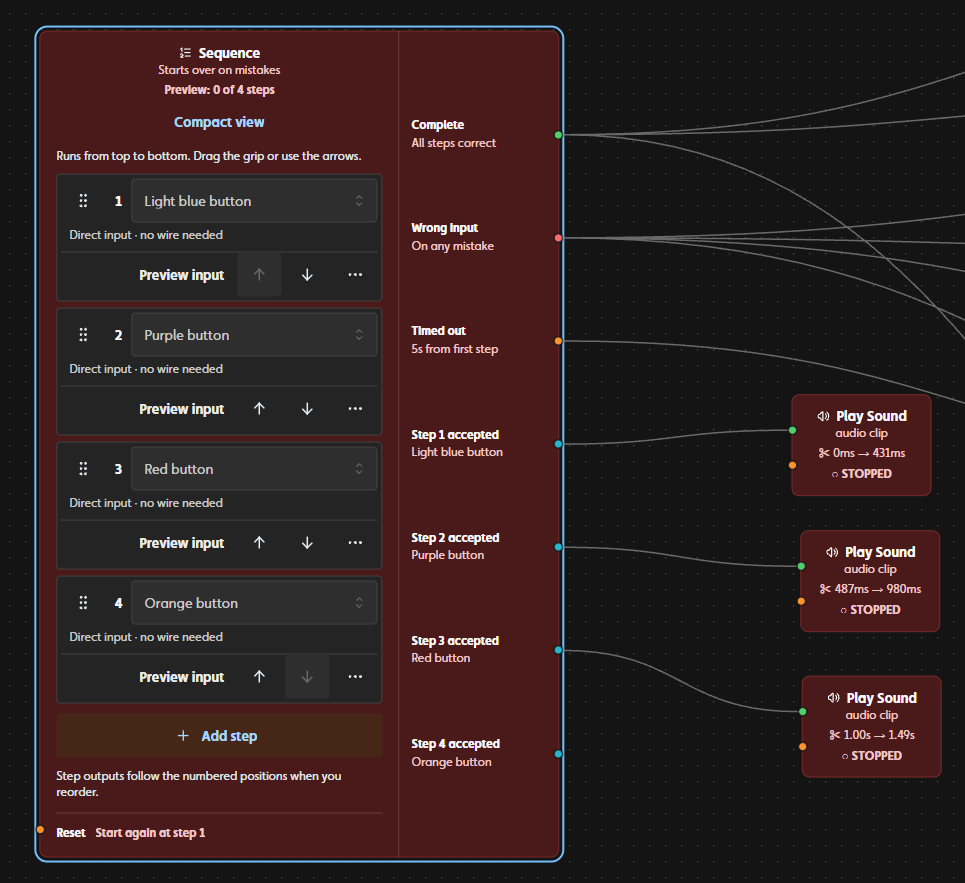
So picture four buttons that have to be pressed in order. Each correct press lights a lamp or plays a sound. A wrong press sounds a buzzer, and you decide if the group keeps their progress or goes back to the start. Give them 20 seconds, and if they don't make it, Timed out runs your try-again cue. Wire in a reset button and the room is ready for the next group.
We added three more blocks while we were in there:
- Any Input fires every time any of its inputs turns on, even if another one is still on. This one fixes something that tripped up a lot of people with the Or block. Think of a hallway of doors that should each creak, including when a guest leaves the first door standing open.
- Cycle takes turns in a round-robin. A, then B, then C, then back to A, so two groups in a row never get the same one or you can increase your hint level progressively.
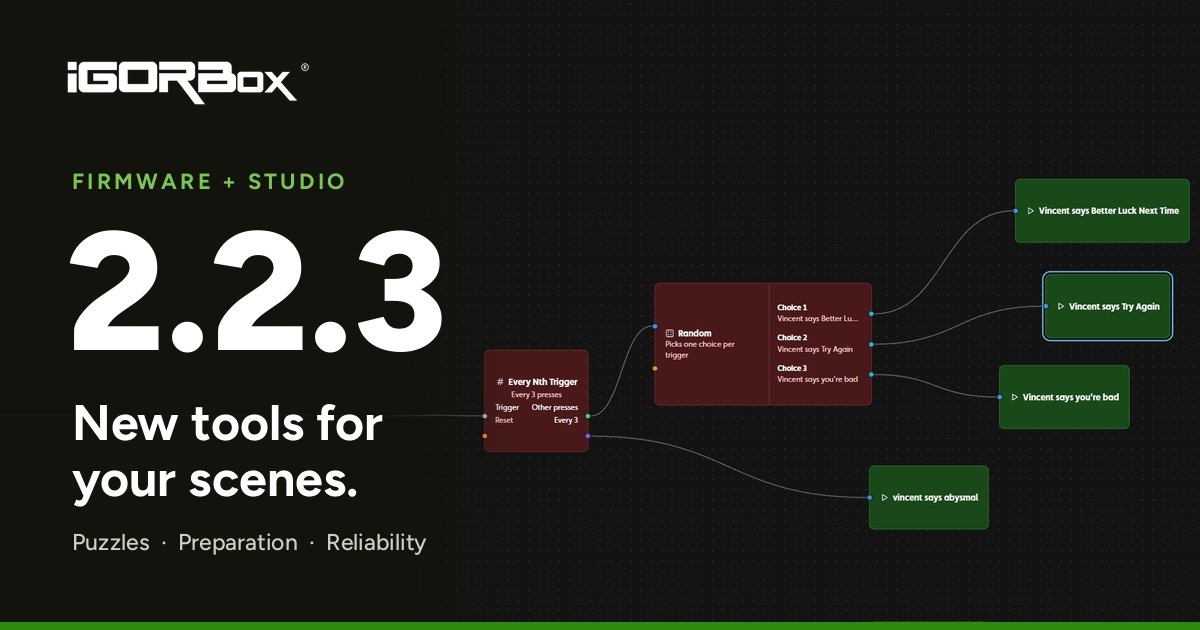
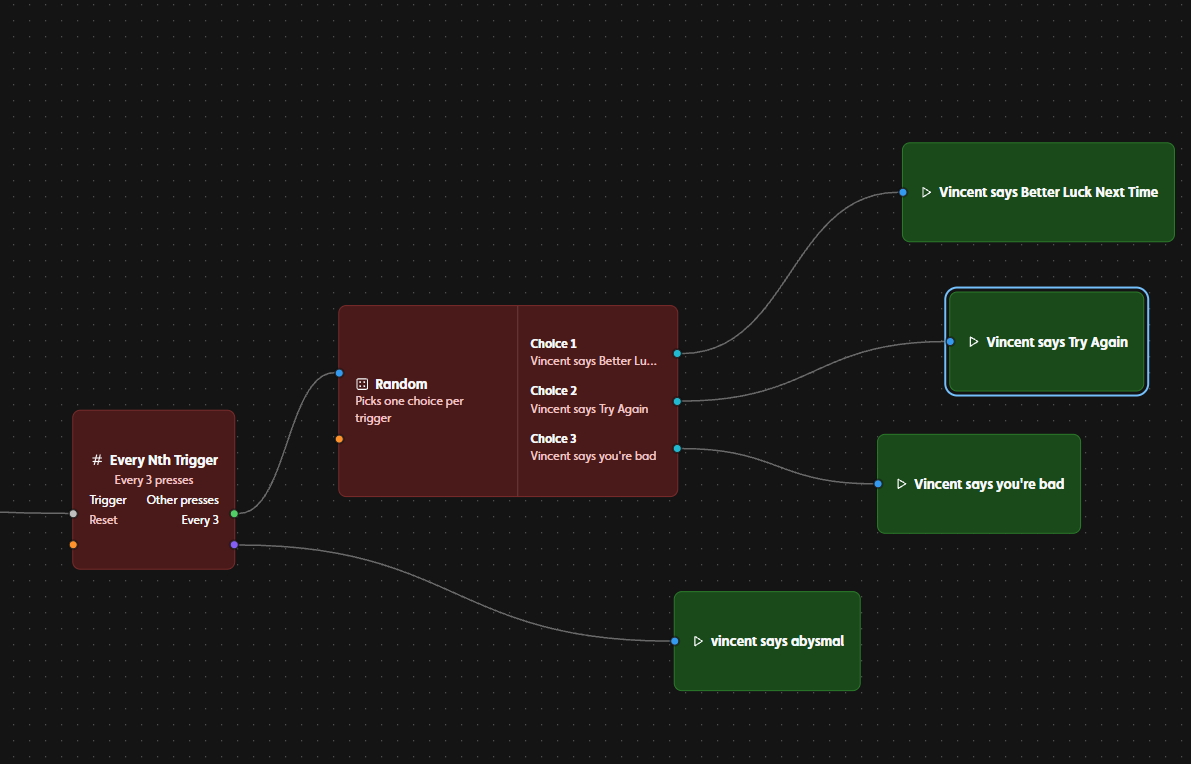
- Every Nth Trigger sends most presses one way and every 5th (or 3rd, or 10th, you pick) another way. That's your rare scare or special hint after so many attempts, and it plays instead of the regular one, not on top of it.
Any Input, Cycle, and the new Sequence options need firmware 2.2.3 on the controller that runs the rule. Every Nth Trigger works today with no firmware update. Logic Rules are on Builder and higher plans.
There are new examples you can build from, and every block is explained in the Building Blocks guide.
A sound cue that can take over
This one started as a question during testing: when a rule plays a sound and a show is already running, should the sound be able to take over?
Sometimes yes! So the Play Sound block now lets you choose. Stop the show first ends the running show and then plays your clip. Or leave it the way it has always worked, where the show's lights and outputs keep going and your clip replaces the show's audio until it finishes. The two are never mixed together.
A show you've protected from interruption keeps running either way, and your ambient routine is never stopped by this. Read about Play Sound.
Knowing what actually happened
I think the worst feeling in this job is pressing a button, having nothing happen, and not knowing why. We did a lot of work on that.
When you deploy a rule, Version history now tells you if the controller really loaded it. You'll see Installed, or Rejected with the reason, and if the previous rule is still running in the meantime. No more guessing if your change made it onto the box.
The Events tab got smarter too. It can tell you if Stop Show stopped a show or if nothing was playing, why a trigger didn't start a show, and when your controllers lose contact with each other and get it back. That last one has already saved us a lot of head scratching.
And if you use Named Triggers to connect your rules, they have their own tab on the Rules page now. You can see which rules use each one, rename it without breaking anything, and find out what depends on it before you delete it.
Learn about deployment results or troubleshoot a trigger.
The things we fixed
This is the less glamorous half of the release, and honestly it might matter more.
- Triggers between controllers are more reliable on WiFi. We also fixed presses that were sometimes missed, or mistaken for a repeat of an earlier press.
- A late trigger is ignored. We decided that a show sequence that fires a few seconds late is worse than one that doesn't fire at all, so a trigger that shows up late no longer starts or stops a show after the moment has passed.
- A Stop trigger stops its own show. That is how it was always supposed to work. There was a bug where it could stop a different show that happened to be playing, and that's fixed. When you want to stop whatever is running, use Stop Show in Studio.
- Audio. We fixed two ways the audio could go silent until a restart, mono files play out of both speakers again, and copied shows that share a sound file with different offsets each play their own part of it.
- Shows. We hardened the show playback system to handle very rapid triggers and re-triggers.
- Inputs. We found an issue with our input management that could cause ghost triggering and fixed it.
- DMX. Controllers no longer intermittently drop their cloud connection during an animated ambient show, and a held channel releases properly after you edit its rule.
Before you open
Update every controller in a scene to 2.2.3, not just one of them. For triggers between controllers, that means the one with the sensor and the ones that respond to it. Pick a quiet time, then walk the room and test your inputs, rules, shows, and board buttons before guests arrive.
Thank you for telling us what you need and where things get frustrating. So much of this release came from your questions and your "it did a weird thing last night" messages, and it is better because of you. Come show us what you build with it on Discord.
Talk soon.